The Morning Inbox Problem
Let’s be honest: reading your overnight emails is rarely the best way to start the day.

You open your inbox and immediately see a wall of messages. Some are important. Some are updates you didn’t really need. And some are newsletters you somehow ended up subscribed to three years ago.
The real problem isn’t email itself. It’s the time it takes to figure out which emails actually matter.
Instead of quickly getting into real work, many of us spend the first part of the morning scanning subjects, opening messages, and trying to prioritise what needs attention.
After a while, the inbox becomes less of a communication tool and more of a daily sorting exercise.
That’s why I started looking for a way to turn my inbox into something simpler — a quick morning briefing rather than a long reading session.
Turning Your Inbox Into a Morning Briefing
Instead of opening and reading every message, you get a short summary that tells you what’s inside your inbox.
Think of it like a daily briefing that shows:
- Which emails require action
- Which ones are just informational
- Which messages might be urgent
- And which ones are probably marketing or spam
This way, instead of opening twenty messages to find the one important request from a colleague, you can immediately see where your attention is needed.
It turns your inbox from a list of messages into a clear overview of what actually matters.
And that small change can save a surprising amount of time every morning.
In the video linked with this article, I show how to build a simple assistant that does exactly that. The setup itself takes only a few minutes, and once it’s running, it can review your unread emails and generate a structured summary as scheduled task every morning.
At the heart of this setup is a simple prompt that tells the assistant exactly how to analyse the inbox.
The Prompt Behind the Inbox Briefing
Copy and paste the below into your Agent Prompt, then tweak it to suit you.
Review all of my unread emails in Outlook.

For each email provide a short structured briefing using this format:
Sender:
Subject:
Summary:
Category:
Needs reply:
Priority:
Suggested action:

Classification rules:
Category must be one of the following:
- Action required
- FYI / Information
- Urgent
- Spam / Marketing
- Other

Needs reply:
- Yes
- No

Priority:
- High
- Medium
- Low

Guidelines:
- The summary must be short (maximum 2 sentences).
- Focus only on the key point of the email.
- If the sender is asking a question, requesting approval, documents, confirmation, pricing, or a meeting, mark it as "Action required".
- If it is a newsletter, promotion, automated notification, or irrelevant outreach, mark it as "Spam / Marketing".
- If the email contains deadlines, problems, complaints, or escalation, mark it as "Urgent".

At the end create an additional section:
INBOX OVERVIEW
Total unread emails:
Action required:
Urgent:
FYI:
Spam / Marketing:

Then list the TOP 5 emails that require my attention first.
The result is essentially a morning inbox report. Instead of reading every email yourself, you quickly see the important messages and where you should focus first.
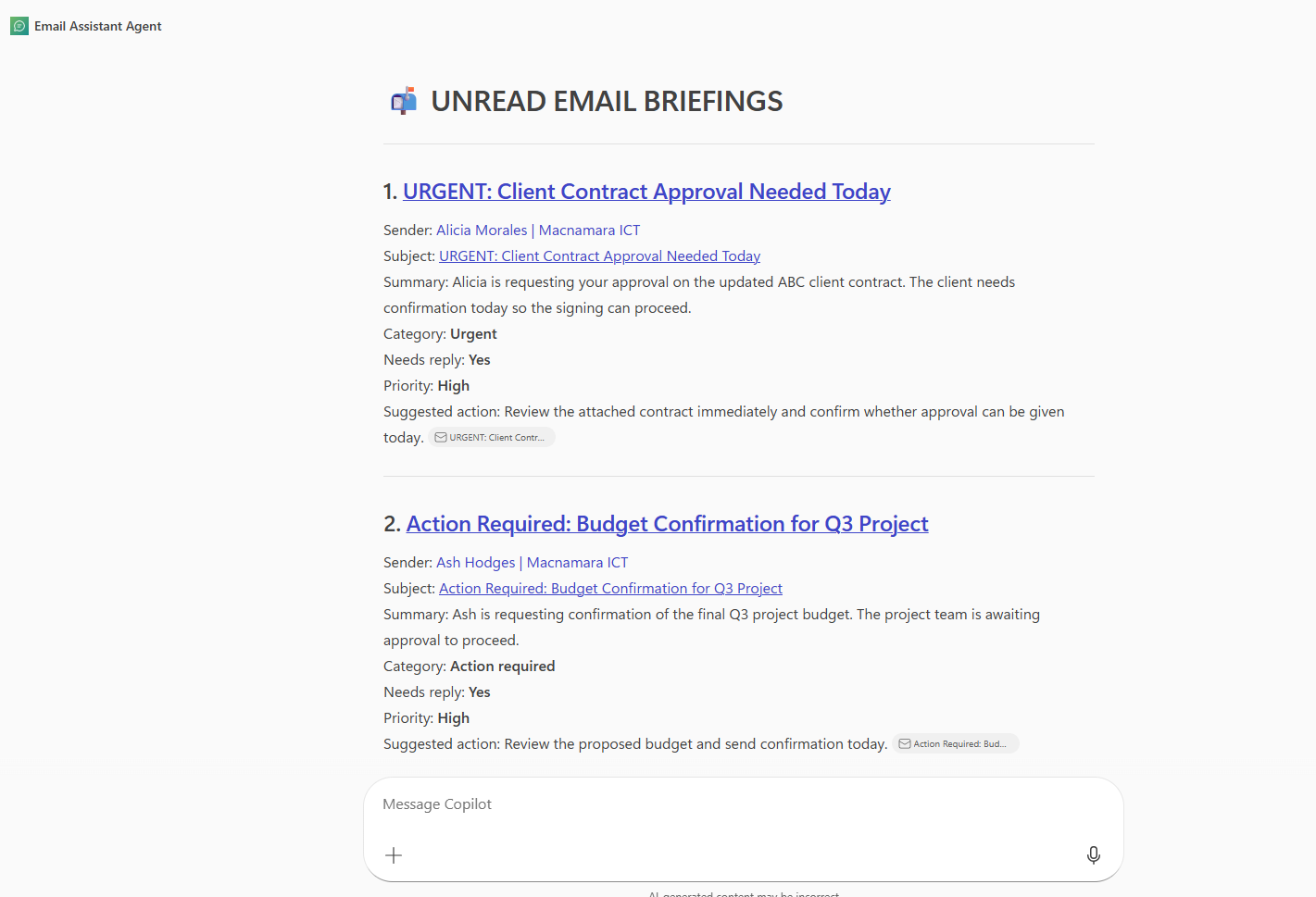
Prompt results
How This Can Help in Everyday Work
The interesting thing about this setup is how flexible it is. Once you have a structured inbox summary, you can use it in several ways.
For example:
- Start your day with a quick inbox overview before opening any emails
- Quickly identify messages that require a response
- Ignore newsletters and marketing messages until later
- Focus on urgent communication first
This simple workflow removes the need to constantly jump between emails trying to understand what matters.
Instead, you start with a clear picture of your inbox.

Ways You Can Improve or Extend This
The assistant shown in the video is only a starting point. Once you understand the idea, there are many ways to expand it.
For example, you could:
• Ask it to suggest draft replies for emails that require a response
• Generate a daily email summary report
• Schedule the summary to run automatically every morning
• Track recurring topics from emails such as projects or client requests
You could even turn it into a daily briefing assistant that summarises emails, meetings, and tasks in one place.
Small improvements like this can gradually turn your inbox into something much easier to manage.