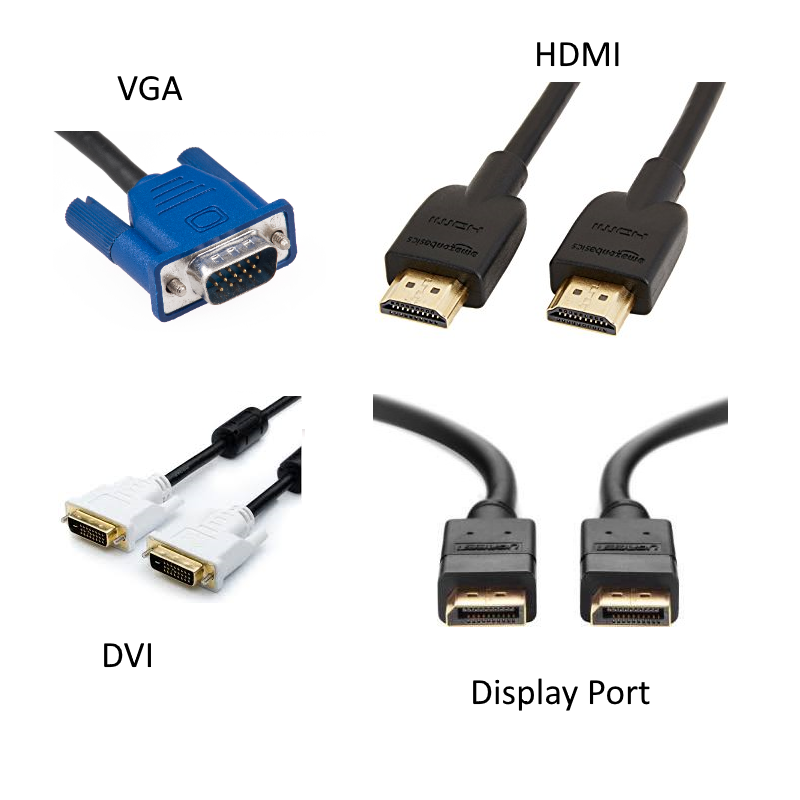
How To Identify Computer Display Ports and Cables

Video Connectors
Choosing the right monitor for your PC, especially if you have multiple screens, can be problematic because unfortunately not all PCs and Monitors have the same port options. Some types of ports come in different sizes. If you have a multi-screen setup you might have multiple ports, but only 1 port of each of a certain type. Older PCs or laptops might also have ports that not available on newer monitors.

Common Ports

Most monitors have at least HDMI and Display ports, but always check before you buy. It’s also worth checking which cables, if any, are included with the monitor.  
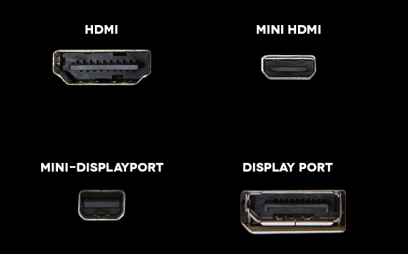
HDMI and Display Port are common to most monitors

Multiple Monitors

If you are using multiple monitors it’s a good idea to make sure they are all the same if possible. This is mainly because you get a consistent resolution and brightness across all screens, making it easier on the eye. If you spend a lot of time looking at your screens, you’ll appreciate it over time!

Since many PCs have 1 each of HDMI and Display Port outputs, and monitors tend to come with only 1 cable, there is a good chance if you are getting multiple screens you’ll need to also purchase at least 1 additional cable.
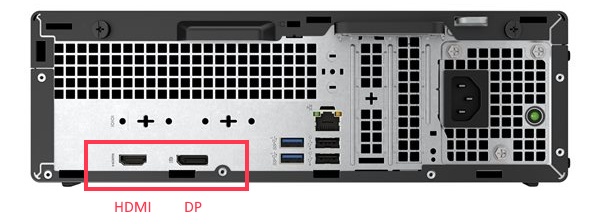
Many PCs have 1 each of HDMI and Display Port

HDMI and Display Port

HDMI ports are pretty common on both PCs and Laptops. They transmit both video and audio so if you output to a screen that has built in speakers, you can use one cable to accommodate both.

Display ports only send video. These are common on desktops, less so on laptops.

The ports look similar, but are easy to identify when you know the difference.

HDMI and Display Port look similar, but easy to tell the difference once you know what to look for

Mini HDMI and Display Port

Both HDMI and Display Port come in a mini version with the same functionality, but with obvious space savings. You can either us a cable with the appropriate connections or an adaptor.

Mini display ports are common in graphics cards supporting multiple monitors, and they usually come with the appropriate adaptors.
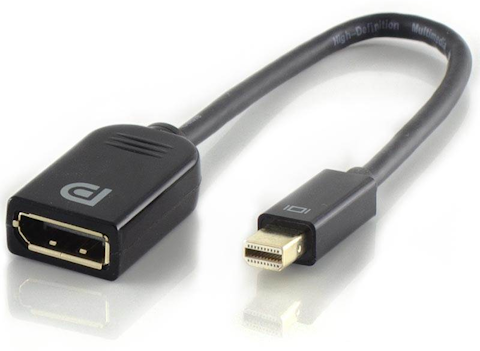
Many adaptors are available to convert mini to standard, or to convert between different connector types

VGA and DVI

These are pretty old connectors and much less common these days. Most modern desktops, laptops and monitors do not have them. If you have this as one of your outputs, you will almost certainly need an adaptor to connect to a modern monitor.

VGA and Display port connections are uncommon on modern devices and monitors

Further Tips

For more tips on how to configure your display settings and use multiple screens see our post How to Configure Your Display and Monitor Settings

Further reading

AI Comparison

AI Chatbots Comparison – Not All The Same

In recent years, AI has transitioned from a term used rarely to hearing it used in almost every conversation. Studies have shown that one in six organisations in the UK use AI in the workplace. This is because AI can automate tasks like drafting emails, summarising meetings and generating report. Some AI models are ‘multimodal’, meaning they can work with text, images, voice and video, while others are ‘unimodal’, built for one type of input like just text.

Read More »

(How To) Start Your Day With A Coffee, Not Your Inbox

Every morning starts the same way: open the inbox, scroll through messages, try to figure out what actually matters. Instead of spending the first 30 minutes reading emails, I built a simple morning assistant that gives me a quick inbox briefing. Now I know exactly what needs attention — before my coffee even gets cold.

Read More »

Copilot 365 Agents and Your Company Data

Most companies already have big amounts of data stored across Microsoft 365 — in SharePoint sites, Excel files, Word documents, and presentations. The challenge is not access to data, but the time it takes to work with it. This project looks at how Copilot 365 agents can help turn existing company data into usable insight faster.

Read More »