

How To Change Your 2FA Mobile Number In Your Microsoft 365 Account

Mobile Gold
We all know that 2FA is a great feature that helps to stop unauthorised people accessing your accounts. But it can be frustrating when you are locked out yourself. One common way that you can be locked out is if your mobile number changes but isn’t updated in your Microsoft account’s security information. Here are some useful steps to keep your security information up to date.

Navigate to your Microsoft account

Open up your web browser and navigate to http://portal.office365.com. Click on your profile picture then ‘View account’.
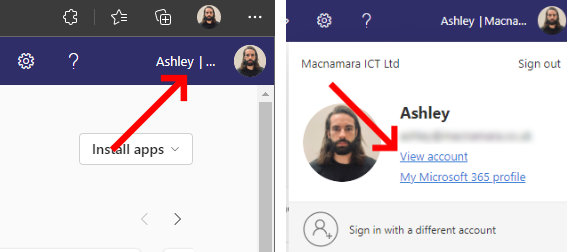
Click your profile picture then 'View Account'
Click your profile picture then ‘View Account’

Look for the ‘Security info’ tile and click on ‘Update Info’.

Click 'Update Info' under Security Info
Click ‘Update Info’ under Security Info

This will take you through to the ‘Security Info’ page where you can update your information relating to sign in methods and password resets. Next to the ‘Phone’ option you will be able to see the current mobile number that is used for 2 factor authentication. Click ‘Change’ to update this number.

Click 'change' next to the existing number
Click ‘change’ next to the existing number

Select your country and type in the new phone number that you want to use for 2FA. Select ‘Text me a code’ and click ‘Next’. You will now be sent a 6 digit code to the number that you entered. Type this code into the on screen prompt and click ‘Next’.

Type the new number to get a PIN to verify

You will now receive a popup letting you know that your phone has been registered successfully. You can now use your newly updated mobile number to sign into your Microsoft 365 account.

Do you use Google Authenticator for 2FA? Check out our guide on How to transfer 2FA accounts from Google Authenticator to a new device


Further reading

Dangers of CEO Fraud

CEO Fraud: Don’t Let It Be You

CEO fraud is a highly targeted scam where criminals impersonate senior leaders to pressure staff into making payments or sharing sensitive information. This article explains how these attacks work, the warning signs to look out for, and the practical steps organisations can take to reduce the risk through awareness training, strong approval processes, MFA and regular security reviews.

Read More »
Copilot Studio

Getting Started with Copilot Studio

Artificial Intelligence is becoming a major part of modern business, and more organisations are starting to look at AI not only as a trend, but as a real productivity tool. One of Microsoft’s most powerful platforms in this space is Copilot Studio.

Read More »
