

What Does This Mean, And Why The Change?
Let’s briefly recap the ‘old guidance’ – i.e. what you are doing now with strong passwords and Multi-Factor Authentication (MFA), which is likely to continue to be the only option for many sites and services for a while yet – and then examine what passkeys are, how they work, and why the NCSC deems them more secure, and easier, than passwords and MFA.
Definitions
It’s worth noting some acronyms are used interchangeably, but really refer to the same thing – something else on top of a password. FIDO is the odd one out here:
2SV (Two-Step Verification) means you must complete two separate steps, such as entering your password and then a code sent to your phone, to confirm your identity.
2FA (Two-Factor Authentication) requires two different types of credentials – like a password and a fingerprint – to verify access.
MFA (Multi-Factor Authentication) uses two or more distinct credentials, for example, a password, a phone, or biometric data, to increase login security.
FIDO (Fast Identity Online) is a set of open standards that enable secure, passwordless logins using public-key cryptography, helping prevent phishing and credential theft.

From Passwords and MFA to Passkeys: A Timeline of Evolving Guidance
To fully appreciate this new direction, it helps to see how authentication guidance has evolved over time:

Best practice has shifted from creating better passwords, through adding extra factors, and now towards eliminating passwords entirely. This stance didn’t come out of nowhere – it reflects years of technological progress and mounting evidence that we need a fundamentally different approach to authentication.
What’s Wrong With Passwords (Even with MFA)?
Why move away from the password-plus-MFA model? Simply put, passwords have inherent weaknesses, and two-factor authentication can be undermined. There are still problems with traditional logins:
- Password fatigue and human error: We have too many passwords to remember, which leads to risky habits like re-using passwords or choosing weak ones that are easy to recall. Attackers exploit this with credential stuffing (trying stolen passwords on other accounts) and simple guessing. Enforcing complex requirements often backfires – we either forget the password or use predictable patterns of iteration.
- Phishing and breaches: We’re constantly prompted to enter passwords online, which makes us less wary about where we enter them. Phishing emails and fake websites take advantage of this – tricking us into entering our credentials into a malicious lookalike site is alarmingly easy. Re-used passwords can give attackers access to any other sites on which it has been used.
- MFA isn’t bulletproof: While adding an extra login step does dramatically improve security, it’s not foolproof. We can still be phished into giving away one-time codes to a fake website. In some cases, attackers can bypass MFA. The NCSC’s research points out that all common forms of traditional 2FA are still “phishable” in some way. This doesn’t mean MFA is useless. Far from it. It stops the vast majority of bulk attacks, but it is not invulnerable.
Passwords, even with a second factor, are still a big target for attackers. Weak passwords and password re-use, along with social engineering tactics can defeat them. The NCSC notes rather bluntly that password-based logins have “passed their sell-by date.”
Passkeys: A Simpler and Safer Way to Sign In
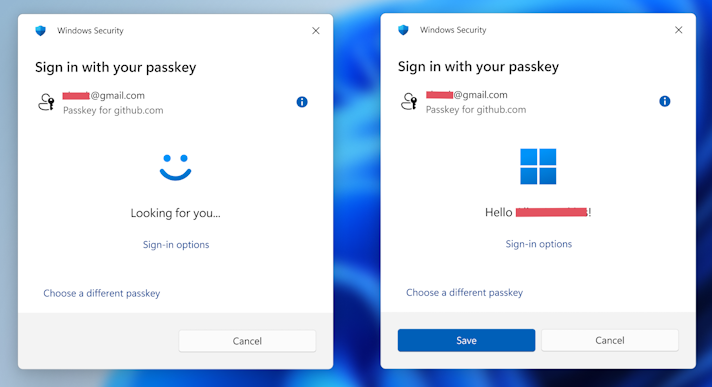
Passkeys are a new type of login credential developed to address these very problems. In short, a passkey lets you log in without ever having to remember or manually type a secret. It works seamlessly with something you already do like unlock your phone or your computer.
You might have already seen options like “Sign in with a passkey” or “Use device credential” pop up on services like Google, Microsoft, PayPal, eBay, Apple, and others – these are based on the passkey technology. The idea is that passwordless authentication is both more secure and more convenient.
What Is a Passkey?
A passkey is a secure credential (based on FIDO standards) that lives on your devices rather than in your head.
- When you create a passkey for an account, the device you are using generates a unique pair of cryptographic “keys.”
- One is a private key (the passkey), which stays on your device and is secret.
- The other is a public key which gets stored with the online service.
You don’t manage these keys yourself; your device’s credential manager (Apple’s iCloud Keychain, Google Password Manager, etc.) handles it for you automatically.
- To log in, you approve the sign-in on your device, usually the same way you unlock it, by scanning your fingerprint, facial recognition, or entering a PIN. This confirms “Yes, it’s really me.” Your device then uses your private passkey to answer a the logon ‘challenge’ from the website, proving you have the key without revealing it. The service compares this with the public key (the verifier it has on file) to validate the login.
Your secret passkey is never sent over the internet. The website only ever sees the public half and a cryptographic proof. In simple terms, it’s like the service has a padlock and only your device has the key – and you never give that key away. If a phisher tricks you onto a fake site, your device won’t release your passkey because the padlock doesn’t match. This built-in ‘origin check’ means phishing websites can’t trigger your passkey at all.
Logging in with a passkey is as easy as unlocking your device and therefore very straightforward:
- No more passwords to remember or type. When a site offers “Use a passkey,” you simply authenticate on your phone or computer (the prompt might say “Approve this sign-in with your fingerprint or face”).
- If you’re using a different device: Many platforms will let you use your phone to authenticate the login (for example, scanning a QR code or using Bluetooth) so you still don’t have to type a password.
- Your passkeys can be synced securely across your devices: This is done through your Apple iCloud or Google account so that losing your device doesn’t lock you out. The credential manager makes backup copies of your keys and can copy them to your new phone or laptop when you sign in with your account.
From a security perspective, behind the scenes it uses robust public-key cryptography instead of shared secrets. This combination of usability and security is why the NCSC and others are excited about passkeys as a simpler and safer alternative to passwords.
How Are Passkeys Different From Passwords, And Why Are They More Secure?
1. No Shared Secrets: With passwords, the secret (i.e. your password) is shared between you and the service – and often reused across sites – making it vulnerable to theft. Passkeys eliminate shared secrets: the only secret (your private key) never leaves your device.
2. Phishing Resistance: Because of how cryptography and device authentication works, it’s nearly impossible for phishers to trick you into giving up access. You can’t be fooled into typing a passkey into a fake site as you will never be asked to type it in the first place. Your device can and will only complete the login for the legitimate website/app it’s registered to.
3. Stops Password Reuse & Weak Passwords: Passkeys are always strong – you’ll never have a passkey that’s ‘123456’ or ‘password123’ by mistake. Every passkey created is effectively a long, random cryptographic secret. And since they’re unique for every account, there’s no risk of re-use. This blocks the credential stuffing attacks that exploit reused passwords across services.
4. Built-in MFA: Passkey authentication can fulfill the role of multi-factor authentication. Consider the factors:
- “something you know” (password)
- “something you have” (phone)
- “something you are” (biometric)
In a passkey scenario, having the device and its unlocking serve as both of the two factors in one smooth flow. You prove you have your device and you are the authorised user of it in one step.
The NCSC’s analysis confirms that a passkey login is at least as secure as a strong password plus MFA, and generally more so. Since there is no way to trick the system with a fake “something you have/are”, it closes off avenues that attackers can exploit.
5. Greater Resilience to Large-Scale Attacks: By removing passwords, passkeys remove the low-hanging fruit that cyber criminals often go after. With passkeys, there is no reusable credential for malware to scrape or for attackers to buy on the dark web. This forces attackers to attempt far more difficult, targeted hacks (like stealing an unlocked device or tricking a user into approving something on their device), which don’t scale well. As passkey adoption accelerates, phishing attacks become much less effective across the board.
While nothing is ‘un-hackable’, passkeys significantly raise the difficulty for attackers, especially against the average mass phishing or fraud campaigns.
Passkeys Are Easier
Security improvements often come at the cost of convenience – but passkeysenhance security and usability at the same time.
- No passwords to remember or reset: Your device manages the secret.
- Faster logins: Sign in with a tap or biometric – quicker than passwords plus 2FA.
- Fewer support calls: Fewer lockouts and recovery requests to Support desks.
- Cross‑device convenience: Passkeys sync securely across your devices.
- Privacy and control: Biometrics stay on your device.
Embracing Passkeys: What Should You Do?
The adoption of passkeys is accelerating. Google, Microsoft, Apple, Amazon, PayPal, eBay, and Visa are all making passkeys available. Over half of active Google users in the UK created a passkey by early 2026. The FIDO Alliance reports that 53% of people have enabled a passkey on at least one account, as service providers embrace passwordless authentication.
The NCSC recommends using passkeys wherever possible, and to maintain strong passwords with two-factor authentication for services that do not (yet) support them. While we are still moving towards more universal passkey adoption, maintaining good security hygiene in those accounts that do not yet support it remains essential.
Conclusion
The NCSC’s endorsement of passkeys is a major turning point in online security best practice. After years of teaching us to juggle passwords and secondary codes, we finally have technology that can sidestep those pitfalls altogether. Passkeys offer a way to log in that is both more secure (thanks to phishing-resistant, unique cryptographic keys) and more convenient (no memorization, faster sign-ins) than the old password-based methods.
The takeaway is simple: using a passkey is like using your fingerprint or face to unlock your account, instead of typing a password. It’s easier for you, and far harder for criminals to beat.
While we’ll not be throwing away our passwords overnight, we are at the start of a transition to a passwordless future. As passkeys are adopted and we become comfortable with them, we can expect phishing attacks and credential theft to become less effective, leading to a safer digital ecosystem for everyone.
In the meantime, keep your current passwords strong and your 2FA enabled on accounts that need them – but do try out passkeys as you see them available. You’ll likely find the experience refreshingly easy, and you’ll be contributing to better security by leaving the password in the past – where it belongs.
Links:
- National Cyber Security Centre – Passkeys: what you need to know | National Cyber Security Centre
- The Register – NCSC: Passkeys now good enough to be the default standard • The Register
- FIDO Alliance – FIDO Alliance: Reducing Reliance on Passwords


